Effective Date: 2026-04-30T18:30:00Z→2026-09-19T18:30:00Z
What’s Happening?
We are retiring two of our legacy domains — pq.is and ln-k.me — on September 20, 2026. After this date, these domains will no longer be active, and any short links using them will stop working.
This decision allows us to focus our resources on maintaining and improving our core platform while continuing to offer you reliable, high-quality link shortening services through our other domains.
Why Are We Sunsetting These Domains?
As Linko has grown, we’ve evaluated our domain portfolio to ensure we’re providing the best value and experience for our users. After careful consideration, we’ve decided to consolidate our offerings:
- Low adoption: These domains have seen limited usage compared to our primary domains
- Resource optimization: Maintaining multiple domains requires ongoing investment that we’d rather direct toward platform improvements and new features
- Simplified experience: Fewer domain options means a more streamlined experience for all users
We understand this may cause some inconvenience, and we sincerely appreciate your understanding as we make this transition.
Am I Affected?
You are affected if you have any of the following using pq.is or ln-k.me:
- Short Links
- QR Codes
- Bio Pages
- Hosted Files
How to Check Your Content
You can easily filter your dashboard to find affected content by adding the domain filter to the URL.
Here are the filter URLs you can use:
For pq.is:
/user/links?domain=https%3A%2F%2Fpq.is
/user/qr?domain=https%3A%2F%2Fpq.is
/user/bio?domain=https%3A%2F%2Fpq.is
/user/files?domain=https%3A%2F%2Fpq.is
For ln-k.me:
/user/links?domain=https%3A%2F%2Fln-k.me
/user/qr?domain=https%3A%2F%2Fln-k.me
/user/bio?domain=https%3A%2F%2Fln-k.me
/user/files?domain=https%3A%2F%2Fln-k.me
 Important Warning
Please read carefully:
After September 20, 2026, all content on pq.is and ln-k.me will permanently stop working. This means:
 Short links will return errors and not redirect
- QR codes pointing to these domains will no longer function
- Bio pages on these domains will become inaccessible
- Hosted files on these domains will no longer be downloadable
- Any analytics or click data will remain, but the links themselves will be dead
There is no automatic migration. You must manually update your links, QR codes, bio pages, and files to a new domain before the deadline.
Once you migrate to a new domain, your URLs will change. You will need to redistribute your new links anywhere you’ve shared the old ones — social media, emails, print materials, QR codes, etc.
How to Migrate Your Content
You have two options to migrate your existing content:
Option 1: Use allmylink.me
Switch your content to our available domain, allmylink.me.
Steps to change your content’s domain:
-
Go to the respective dashboard page (Links, QR Codes, Bio Pages, or Files)
-
Find the item you want to migrate
-
You can select all affected links and use the bulk domain option to change the domain for all links at once.
-
Or, click the Edit button (pencil icon)
-
In the Domain dropdown, select allmylink.me
-
Click Save
-
Your content will now use the new domain with the same alias (if available)
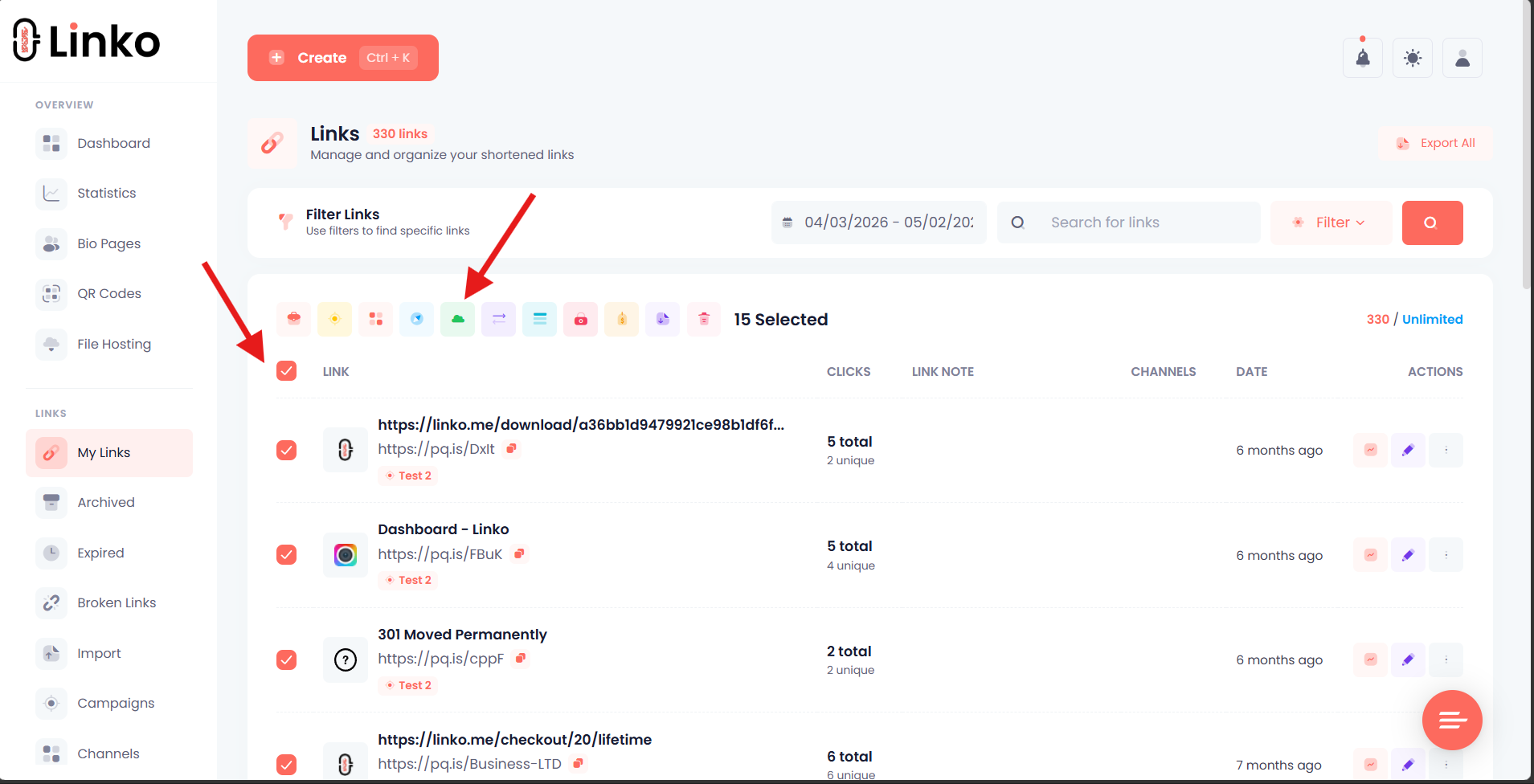
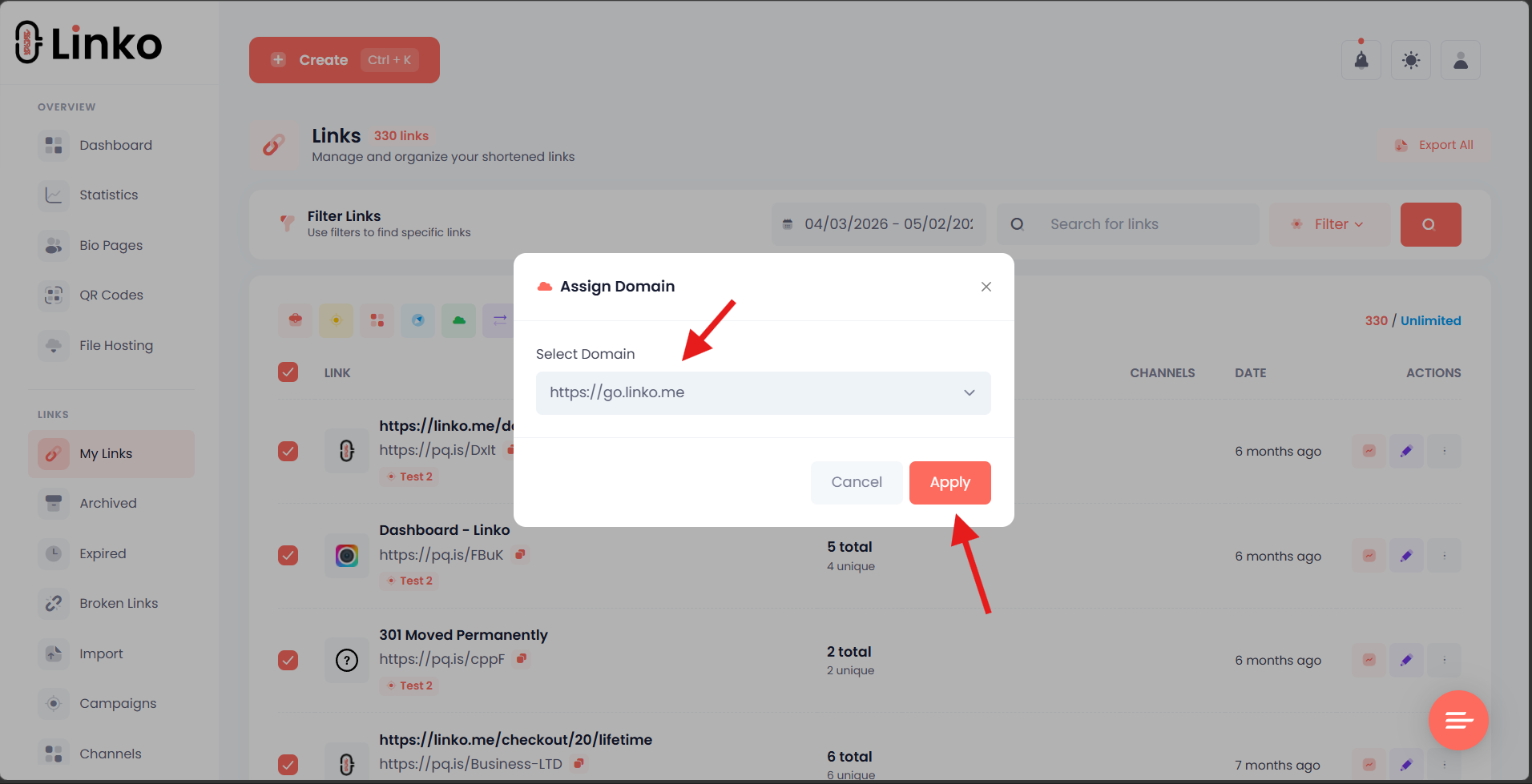
Note: If your alias is already taken on allmylink.me, you’ll need to choose a different alias.
Option 2: Use Your Own Branded Domain (Recommended)
For the best long-term solution, we recommend adding your own custom domain. This gives you:
 Full control over your brand
- No dependency on third-party domains
- Professional appearance
- Protection from future domain changes
Steps to add your own domain:
- Go to Branded Domains in your dashboard
- Click Add Domain
- Enter your domain (e.g.,
go.yourbrand.com) - Add the DNS records as instructed:
- CNAME record pointing to
linko.me
- CNAME record pointing to
- Wait for DNS propagation (usually 5-30 minutes)
- Once verified, your domain is ready to use
- Edit your existing content and select your new branded domain
Migration Checklist
Use this checklist to ensure a smooth transition:
- Identify affected content — Filter your links, QR codes, bio pages, and files by pq.is and ln-k.me domains
- Choose your new domain — allmylink.me or your own branded domain
- Update each item — Change the domain in settings for each link, QR code, bio page, and file
- Test your new URLs — Make sure they work correctly
- Update external references — Replace old URLs wherever you’ve shared them:
- Social media profiles and posts
- Email signatures and campaigns
- Printed materials (business cards, flyers, posters)
- QR codes (you’ll need to regenerate these)
- Website buttons and embedded links
- File download links shared with others
- Third-party integrations
- Notify your audience (if applicable) — Let followers know about updated links
- Complete before September 20, 2026
Frequently Asked Questions
Q: Will my click statistics be preserved?
A: Yes, all your historical analytics data will remain intact. Only the domain of your content will change.
Q: Can I keep the same alias/slug?
A: Yes, if the alias is available on your new domain. If it’s taken, you’ll need to choose a different one.
Q: What happens if I don’t migrate before the deadline?
A: Your content will stop working on September 20, 2026. Links will return errors, bio pages will be inaccessible, and files will no longer be downloadable.
Q: Can I migrate content in bulk?
A: Yes, for links and bio pages we have a bulk domain option to change the links’ domain in bulk.
Q: Will my QR codes still work after changing the domain?
A: QR codes encode the full URL, so if you change the domain, you’ll need to regenerate and reprint your QR codes.
Q: I have a bio page on these domains. What should I do?
A: Edit your bio page and change its domain to an available option. Then update the link wherever you’ve shared it.
Q: What about my hosted files?
A: Edit each file in your Files dashboard and change the domain. Anyone with the old download link will need the new URL to access the file.
Timeline
| Date | Action |
|---|---|
| May 1, 2026 | Announcement & domains hidden from new content creation |
| May 1 – Sept 19, 2026 | Migration period — update your content |
| September 20, 2026 | Domains retired — all content stops working |
Interested in These Domains?
If you’re interested in acquiring pq.is or ln-k.me for your own use, please contact us. We’re open to selling these domains to interested parties only after 30 September.
Need Help?
If you have questions or need assistance with migration, we’re here to help:
 Email: contact@linko.me
 Contact Page: Contact Us - We're Here to Help - Linko
We appreciate your understanding and continued support as we make this transition. Thank you for being part of the Linko community!
Last Updated: May 1, 2026