You can convert a .RTF file to a QR code for free using either a cloud upload method or a direct file-to-QR service.
Most free QR tools don’t support direct RTF uploads, but Linko’s free file QR code generator lets you upload your document directly, no workarounds needed.
This makes it easy to share resumes, notes, or formatted text files without hosting the file elsewhere.
 Method 1: Upload Your .RTF File Directly to Linko’s Free QR Code Generator
The fastest and most direct way to create a QR code for an RTF file is by using linko QR tool. Unlike most tools that only support links, Linko accepts actual files.
Steps:
-
Sign up for a free account at Linko.me.
-
Go to the Create QR section inside your dashboard.
-
Choose “File” under Dynamic QR options.
-
Upload your
.RTFfile (maximum size: 5MB). -
(Optional) Customize your QR design — choose colors, add a logo, or tweak shape styles.
-
Click Generate, then download your QR image.
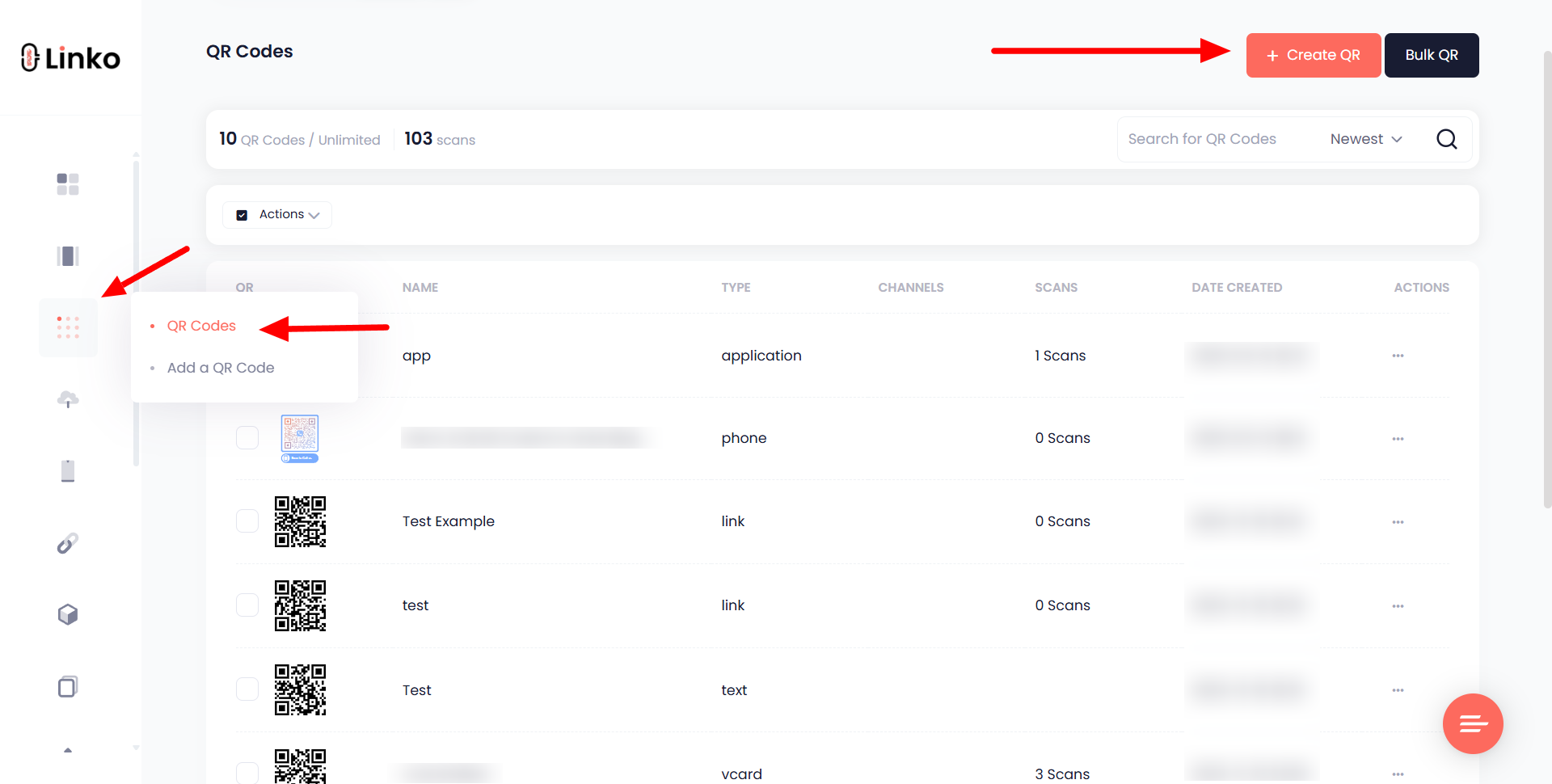
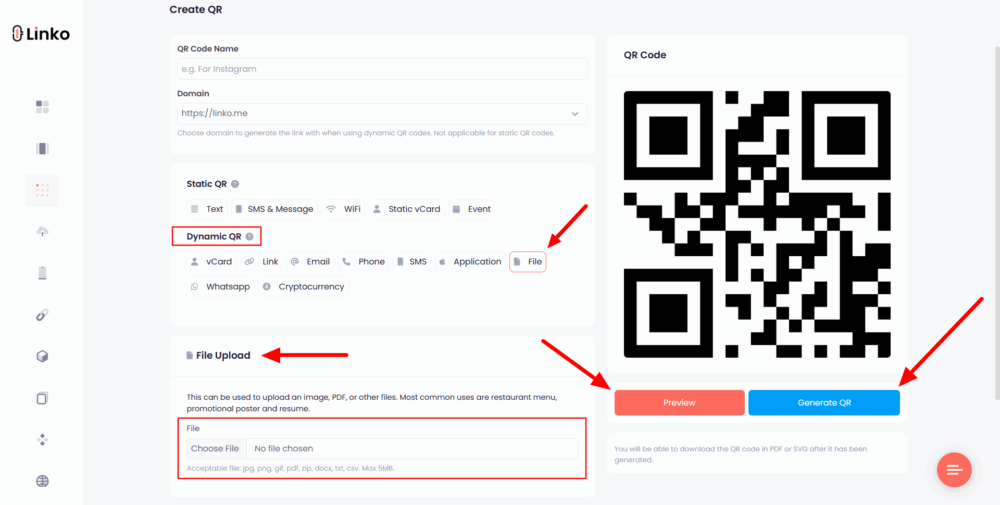
This QR is dynamic, so you can edit or replace the file later without changing the code.
It’s ideal for resumes, editable formatted reports, or public access documents you may want to update without reprinting QR codes.
Method 2: Host the .RTF File and Convert the Link into a QR Code
If you’re using a basic free QR tool that doesn’t allow file uploads, you can still share your RTF by uploading it to a public file-sharing platform.
Steps:
-
Upload the
.RTFfile to Google Drive, Dropbox, or another cloud service. -
Make sure the file is publicly viewable or shareable via link.
-
Copy the shareable URL.
-
Visit any free static QR generator (like Linko’s static link QR tool).
-
Paste the link, adjust design (if needed), and download the QR code.
This method works well for basic use cases, like handing out digital brochures or homework assignments.
But since it’s a static QR, you can’t edit or update the destination without reprinting the code.
Why Use a File-Based QR Instead of a Link-Based One?
Using a direct file upload means fewer steps and cleaner delivery. There’s no risk of link expiration or broken access settings.
Dynamic QR codes from platforms like Linko also give you analytics, editing control, and a smoother sharing process, which is perfect for educators, job seekers, and professionals managing document access at events or booths.
With both methods, you can convert your .RTF document into a scannable, portable, and printable QR code for free and in just a few clicks.